

How to Disassemble an HMTD Connector: Step-by-Step Guide
If you are an engineer working out in the field with Intrepid products, you might occasionally need to adjust or reorient your HMTD cables. Because these connectors feature secondary locking mechanisms to ensure signal integrity, taking them apart requires a specific technique to avoid damaging the housing or the wires.
We’ve put together this quick step-by-step tutorial to help you safely disassemble your HMTD cables.
Tools Required
Before you begin, you only need two things:
- Your HMTD jack-to-jack cable
- A small flathead precision screwdriver
Step 1: Release the Top Cap
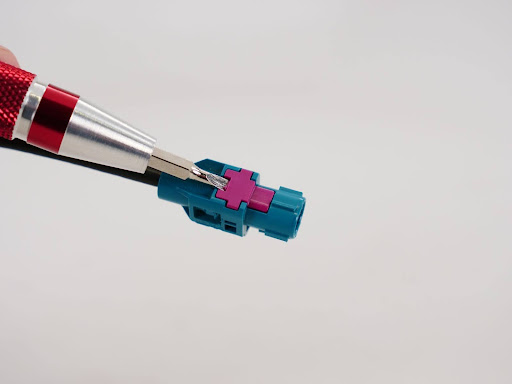
The HMTD housing features a secondary locking mechanism topped with a purple cap to prevent accidental disconnections. To bypass this, insert your small precision screwdriver into the notch of the top cap. Gently pry upward until the cap pops loose.

Step 2: Position Your Grip
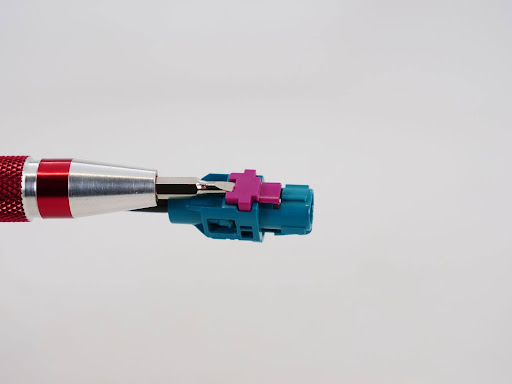
Before applying force to remove the internals, ensure you have a firm and safe grip. Hold the connector housing steadily with one hand, and position your other hand to pull the cable once the internal clip is released. Crucial tip: Focus your grip on the cable strain relief itself. Avoid pulling directly on the wires with excessive force, as this can damage the cable.

Step 3: Release the Retaining Clip
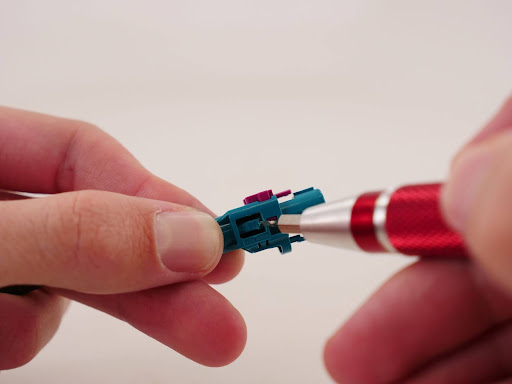
This is the most critical step of the process. Inside the housing, a small plastic or metal retaining clip holds the insert firmly in place. Use your flathead screwdriver to gently pull up on this internal retaining clip. While the clip is lifted, smoothly slide the internal cable assembly out of the outer housing.
Step 4: Flip the Cable Orientation
Now that the internal jack is free from the housing, you can flip or rotate the cable to your desired orientation.
Note: Depending on the specific housing generation of your HMTD connector, you might encounter some resistance when trying to seat it in a new orientation. If so, it may require a slight modification. You can either flatten the metal detent on the crimped connector or trim the plastic guide rails on the cable insert to ensure it seats fully.
Step 5: Reinsert the Assembly
To reassemble, slide the modified or rotated cable back into the housing, ensuring it is fully seated. Press the purple top cap back down until you hear a distinct click. Finally, give the cable a light tug to ensure everything is securely locked in place and your signal integrity remains rock solid.